How to Read and Understand a Tech Pack: A Beginner’s Guide fora Clothing Brand Founders
Imagine you’ve finally found a factory willing to make your dream hoodie design. You send over a rough sketch, a few reference photos, and a paragraph explaining what you want. Three weeks later, a sample arrives — and it’s nothing like what you imagined. Wrong fabric, wrong stitching, wrong fit. Your money, your time, and your excitement all evaporate in one unboxing moment.
This happens to thousands of new clothing brand founders every single year. And almost every time, the real problem isn’t the factory. It’s the missing (or badly written) tech pack.
If you’ve ever opened a tech pack and felt your eyes glaze over at all the arrows, measurements, and abbreviations — don’t worry. This guide will walk you through exactly how to read one, line by line, like someone who’s been in the industry for years.
What Exactly Is a Tech Pack?
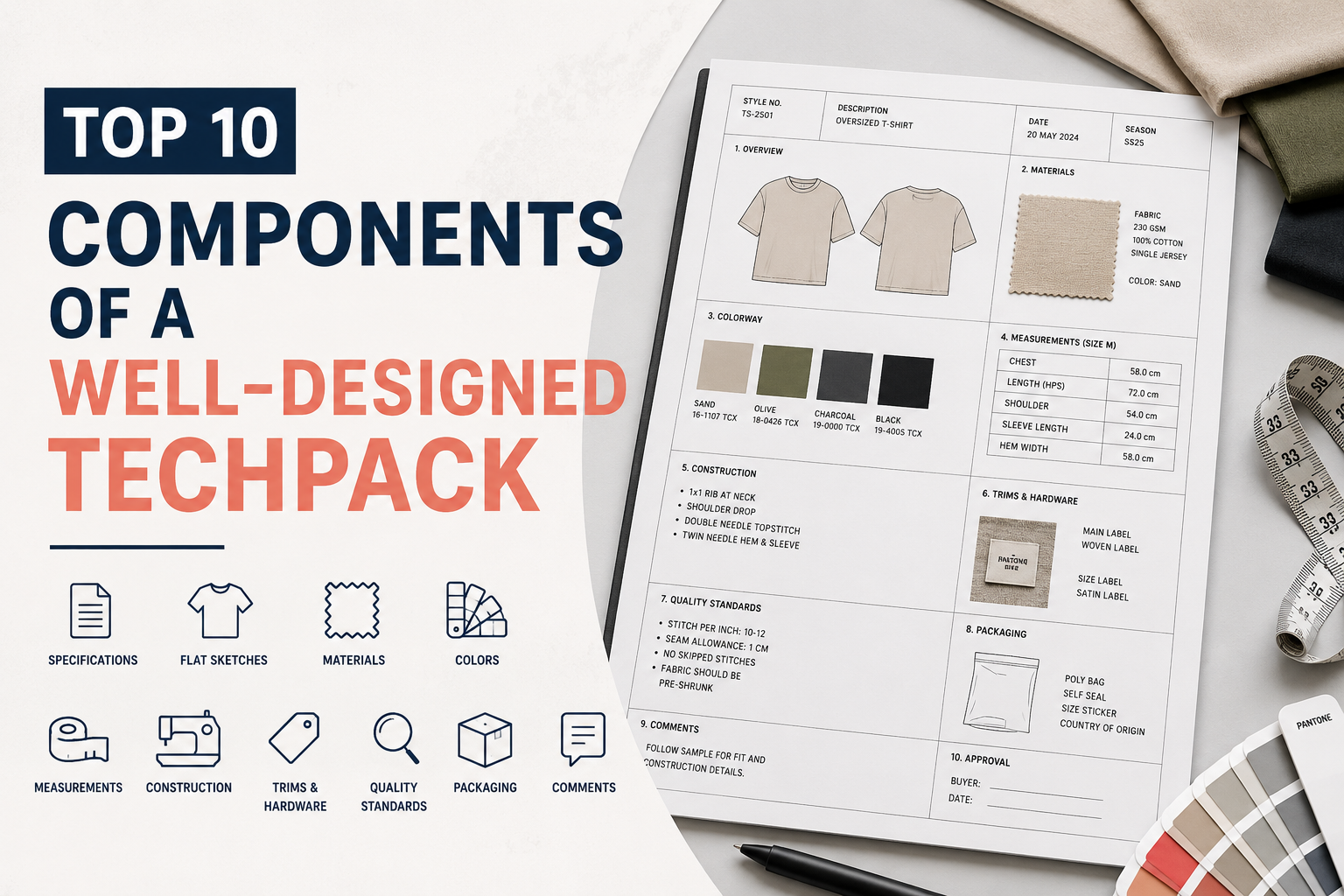
A tech pack (short for “technical package”) is basically the instruction manual for your garment. It’s the document a factory uses to turn your idea into a real, physical product — without needing to guess anything.
Think of it like a blueprint an architect hands to a construction crew. The architect doesn’t stand on-site describing the house verbally. They hand over drawings, measurements, and material specs, and the builders follow them exactly.
A good tech pack usually includes:
- Flat sketches (technical drawings) of the garment
- A detailed measurement chart (called a “spec sheet”)
- Fabric and trim details
- Colorways (color options)
- Stitching and construction notes
- Labeling and packaging instructions
- Grading rules (how sizes scale up or down)
Without this document, you’re relying on a factory to “interpret” your vision — and interpretation is exactly where expensive mistakes are born.
Why Every Founder Needs to Learn to Read One (Not Just Send One)
Here’s something a lot of new founders don’t realize: you don’t just need a tech pack — you need to be able to read and understand one yourself.
Why? Because:
- Factories will send you revised tech packs during production, and you need to catch errors before approving them.
- Sampling rounds involve back-and-forth comments directly on the tech pack.
- If you ever switch factories or hire a new designer, you need to verify the new tech pack matches your original specs.
- Quality control teams compare finished garments against the tech pack — if you don’t understand it, you can’t check their work.
A founder who understands tech packs catches mistakes early. A founder who doesn’t finds out three months later, when 500 units arrive with the wrong sleeve length.
How to Read and Understand a Tech Pack
The Cover Page: Your Garment’s ID Card

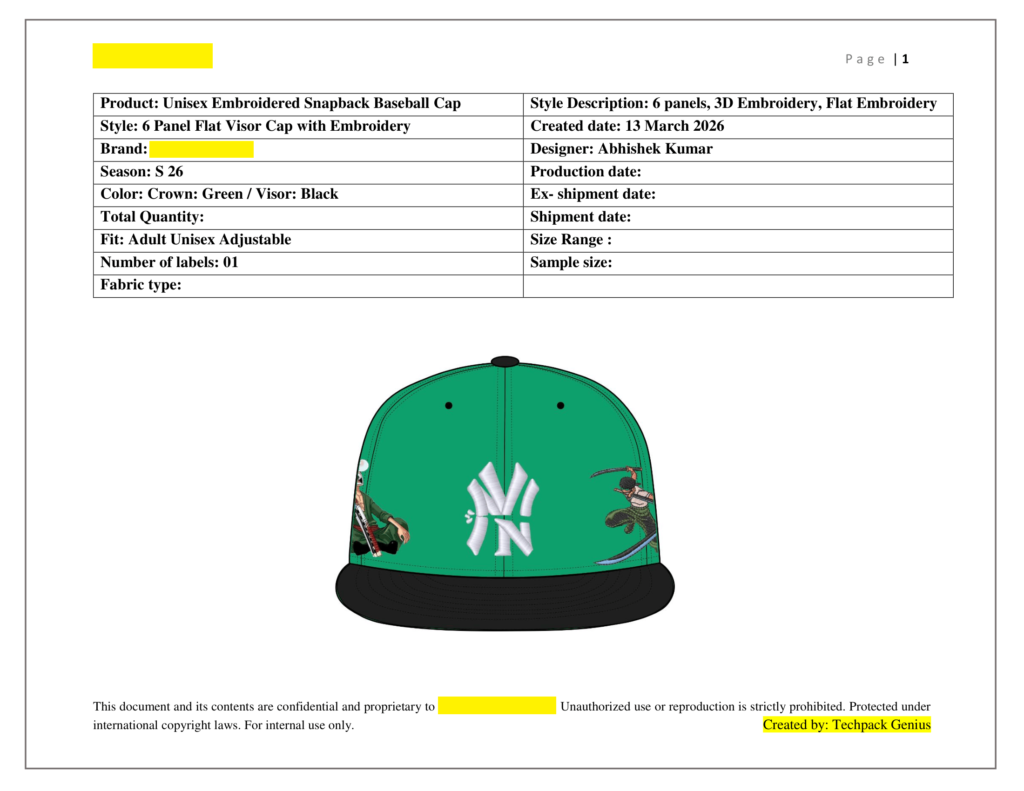
Every tech pack starts with a cover page, and it’s more important than people think. This page usually includes:
- Style name and style number (e.g., “Oversized Crewneck — STYLE #TPG-1042”)
- Season (e.g., “Fall/Winter 2026”)
- Date and version number
- Designer or brand name
- A front and back flat sketch thumbnail
Beginner tip: Always check the version number first. Tech packs get revised constantly during sampling. If your factory is working off “Version 2” while you’re reviewing “Version 4” on your laptop, you’re both about to make expensive mistakes based on outdated information.
Flat Sketches: The Visual Language of Garments
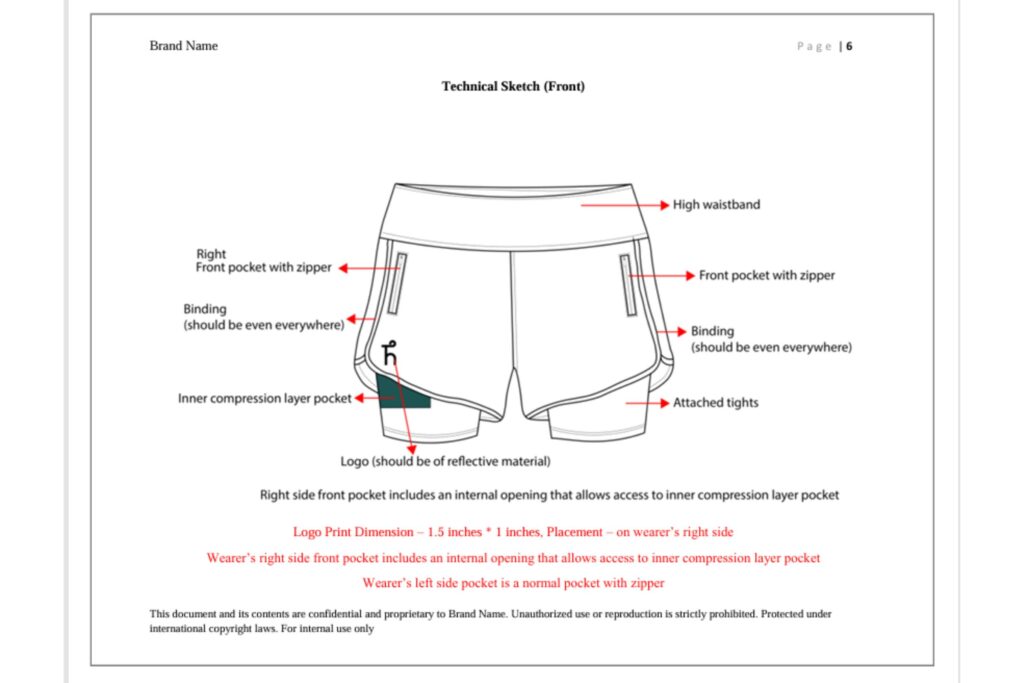
Flat sketches (also called “flats” or “CADs”) are simple black-and-white line drawings showing the garment from the front, back, and sometimes side.
Unlike a fashion illustration, flats aren’t artistic — they’re technical. They show:
- Exact seam placements
- Stitch lines
- Pocket positions
- Zipper or button placement
- Topstitching details
For example, a flat sketch of a t-shirt will show whether the hem has a single-needle stitch or a coverstitch, whether the neckline is ribbed or self-fabric, and exactly where the side seams sit.
How to read them: Look at flats the way you’d read a floor plan. Every line represents something a machine operator will physically sew. If a line is missing or unclear, that detail may get skipped entirely during production.
The Measurement Spec Sheet: Where Most Mistakes Happen

This is the single most important — and most misunderstood — part of any tech pack. The spec sheet is a table listing every key measurement point on the garment (chest width, shoulder length, sleeve length, hem width, and so on) for every size you offer.
Here’s a simplified example for a t-shirt:
| Measurement Point | S | M | L | XL |
|---|---|---|---|---|
| Chest Width | 18″ | 19″ | 20″ | 21″ |
| Body Length | 27″ | 28″ | 29″ | 30″ |
| Sleeve Length | 8″ | 8.25″ | 8.5″ | 8.75″ |
Each measurement is usually taken flat (garment laid on a table, measured point to point, then doubled if needed) rather than around the body. This trips up a lot of beginners who expect the numbers to match body measurements directly.
Practical tip: Always check the “tolerance” column if one exists. Tolerance means the acceptable margin of error (usually ±0.5 cm to ±1 cm). If a factory delivers garments within tolerance but the numbers still feel “off” to you, this is usually why — small variances are completely normal in garment manufacturing, not a defect.
Fabric and Trim Details: The Materials Section
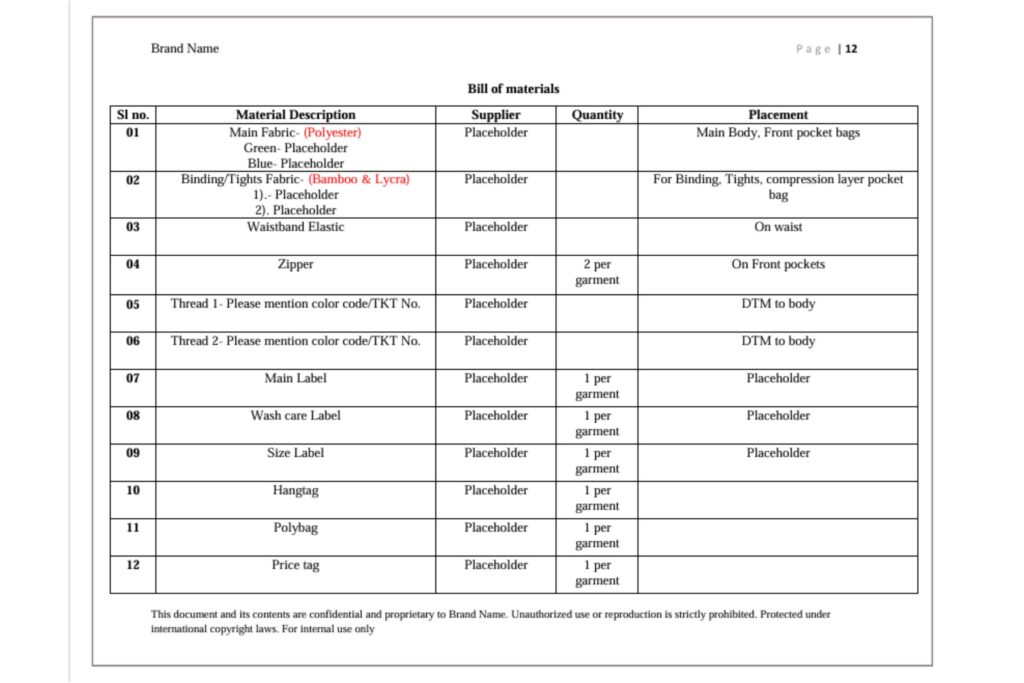
This section lists every physical material used in the garment:
- Fabric composition (e.g., 100% combed cotton, 240 GSM)
- Fabric type (jersey, French terry, twill, ripstop, etc.)
- Trims — zippers, buttons, drawstrings, elastic, labels
- Suppliers (if you already have preferred vendors)
Beginner-friendly explainer — what is GSM? GSM stands for “grams per square meter.” It tells you how heavy or thick a fabric is. A basic t-shirt is usually 160–180 GSM, while a heavyweight streetwear tee is often 220–260 GSM. If your tech pack doesn’t specify GSM, your factory will choose a random weight — and your “premium heavyweight hoodie” could arrive feeling thin and cheap.
Global example: A streetwear brand in Los Angeles ordering from a factory in Karachi, Pakistan needs to specify GSM clearly, since “heavy cotton” means different things in different regions. Precise numbers remove all ambiguity.
Colorways: Making Sure Colors Actually Match
A colorway section shows every color variation your garment will be produced in, usually alongside Pantone codes (a standardized color-matching system used worldwide).
Why Pantone codes matter: “Navy blue” can look ten different ways depending on screen calibration, lighting, or personal interpretation. A Pantone code (like 19-4052 TPX) removes the guesswork completely, because it refers to one exact, universally recognized shade.
Practical tip: If you’re a POD (print-on-demand) creator working with base blanks, colorway sections may be simpler, but you should still confirm the Pantone or hex code of your print colors so they stay consistent across print runs and platforms.
Construction and Stitch Details: The “How It’s Sewn” Section
This part explains exactly how each seam should be constructed. It might look intimidating with terms like:
- Overlock stitch — a stitch that wraps around fabric edges to prevent fraying (common on side seams)
- Coverstitch — a flat, parallel double-stitch often used on hems (you’ll recognize it on most t-shirt bottoms)
- Topstitch — a visible stitch on the outside of the garment, often for reinforcement or style
- Bar tack — a small, dense reinforcement stitch used at stress points like pocket corners or belt loops
You don’t need to memorize every stitch type. But understanding that this section exists — and that changing it changes how durable or premium your garment feels — helps you ask better questions when reviewing samples.
Labeling, Trims, and Packaging Instructions
This section tells the factory exactly how to:
- Attach your brand’s neck label or care label
- Place hangtags
- Fold and bag finished garments
- Apply size stickers or barcodes for retail
Real-world example: A small activewear brand in Australia once received an entire shipment with care labels sewn upside-down, simply because the tech pack showed the label placement but not its orientation. A five-second detail that was missing cost them a full re-labeling job before launch.
Grading Rules: How One Size Becomes Many
Grading is the process of scaling a garment’s measurements up or down to create a full size range from one base pattern (usually a Medium).
A grading section shows the exact increment added or subtracted between sizes — for example, +1 inch in chest width per size up. This matters because inconsistent grading is one of the most common reasons brands get customer complaints like “the Large fits smaller than the Medium.”
Beginner tip: If you’re launching with multiple sizes, always ask your tech pack designer to include a full grading table — not just measurements for one sample size.
How to Actually Review a Tech Pack Before Approving It
Here’s a simple step-by-step checklist you can use every time a factory or designer sends you a tech pack:
- Check the version number and date — make sure you’re reviewing the latest file.
- Compare flat sketches to your original design references — do the proportions match your vision?
- Scan the measurement chart for your base size — does it match what you expect in inches or cm?
- Confirm fabric GSM and composition — is it the weight and material you agreed on?
- Verify colorway Pantone codes — do they match your brand colors exactly?
- Read construction notes for anything unusual — flag anything you don’t recognize.
- Check labeling and packaging instructions — small details here prevent big embarrassments later.
If any of these sections feel confusing or incomplete, that’s a sign to ask questions before approving — not after production starts.
Common Beginner Mistakes When Reading Tech Packs
- Assuming “close enough” is fine. In manufacturing, vague instructions always get interpreted the cheapest, fastest way possible.
- Skipping the grading table. This causes size-to-size fit inconsistency that customers will notice immediately.
- Ignoring tolerance ranges. Small measurement differences are normal, not a factory error.
- Not asking what unfamiliar terms mean. Every experienced factory expects questions from new brands — asking shows you’re serious, not inexperienced.
- Approving a tech pack without checking flat sketches against real references. Sketches can drift from your original vision more than people expect.
Final Thoughts: Your Tech Pack Is Your Safety Net
A tech pack isn’t just paperwork — it’s the single document standing between your creative vision and a factory’s interpretation of it. The more confidently you can read one, the less you depend on luck, translation apps, or crossed fingers to get your product right.
You don’t need to become a patternmaker or a technical designer overnight. You just need to know what each section means, what to check, and what questions to ask. That alone puts you ahead of most first-time founders in this industry.
If you’re about to launch your first collection, take the time to sit with your tech pack for twenty minutes before approving anything. Compare it against your vision, ask about anything unclear, and treat it as your most valuable production tool — because it is.
Frequently Asked Questions
1. What’s the difference between a tech pack and a spec sheet? A spec sheet is just one section inside a tech pack — specifically the measurement chart. A full tech pack includes the spec sheet plus flat sketches, fabric details, colorways, construction notes, and labeling instructions.
2. Do I need a tech pack if I’m only doing print-on-demand? Yes, though it can be simpler. POD creators still benefit from specifying fabric blank details, print placement measurements, and color codes to keep designs consistent across different print providers.
3. Can I create a tech pack myself without design experience? Basic tech packs are possible with templates, but factories respond much faster and more accurately to professionally structured tech packs, since they follow industry-standard formatting factories already recognize.
4. Why do measurements in a spec sheet look smaller than my body size? Because garments are measured flat, not around the body, and most spec sheets measure half of certain points (like chest width) rather than full circumference. Always check the measurement method noted in the tech pack.
5. What does “tolerance” mean in a spec sheet? Tolerance is the acceptable margin of error for each measurement, usually within a fraction of an inch or a centimeter. It exists because manufacturing can never be perfectly exact, and small variances are considered normal, not defective.
6. How many revisions should I expect during the tech pack process? It varies, but two to four rounds of revisions are common as fit, fabric, and construction details get finalized between sampling stages.
7. What happens if I approve a tech pack with an error in it? The factory will produce exactly what’s written, even if it contradicts what you originally wanted. This is why careful review before approval matters more than catching mistakes after production.
Table of Contents