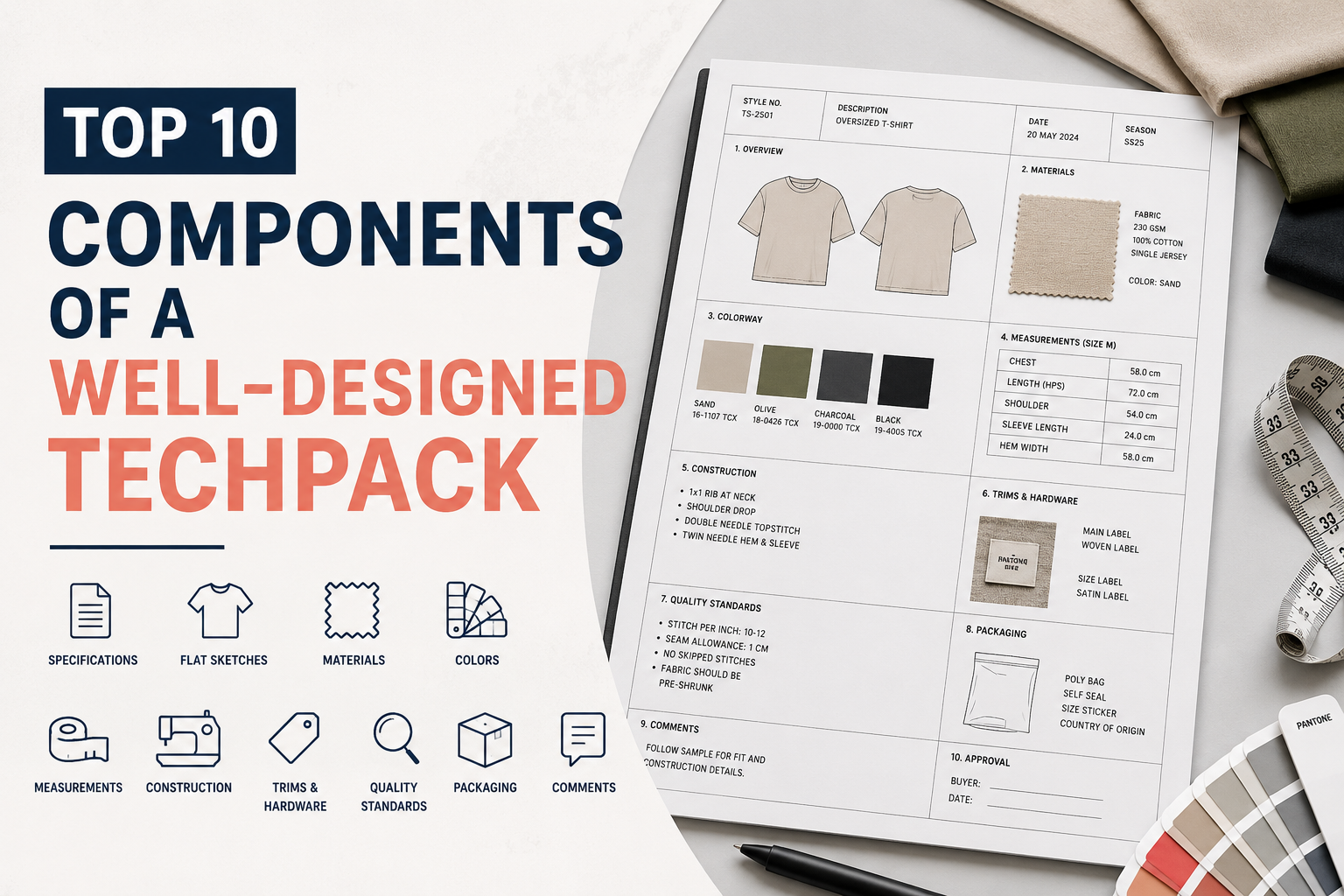
What should be my tech pack file format?
If you’ve gotten far enough into the pre-production process to be asking this question, you’re already ahead of most first-time apparel founders. Most people obsess over what goes inside a tech pack — the bill of materials, the callouts, the grading rules — and never stop to ask what container all of that information should actually live in.
That’s a mistake, because the wrong file format can quietly sabotage an otherwise perfect tech pack. Factories misread flattened PDFs. Measurements get lost when a spec sheet is pasted into Word. Illustrator files won’t open on a merchandiser’s five-year-old laptop in Dhaka or Ho Chi Minh City. None of this is about design quality. It’s about whether your file survives the trip from your laptop to a production manager’s desk with every number, note, and callout intact.
This guide breaks down every file format you’re likely to encounter while building a tech pack, what each one is actually good for, what factories want to receive, and how to match your format to whatever stage of production you’re in.
The Quick Answer
If you only read one section, read this one.
Send your factory a PDF. It’s universally readable, keeps your layout locked exactly as designed, and can’t be accidentally edited by someone three time zones away. Keep your working files in an editable format — Illustrator, a spec-building tool, or a structured spreadsheet — so you (or your designer) can update measurements, colorways, and construction notes without rebuilding the document from scratch every time something changes.
That’s the core rule: editable source file for you, locked PDF for the factory. Everything else in this article is detail on how to apply that rule correctly.
Why File Format Actually Matters (Not Just a Technical Detail)
A tech pack’s entire job is to remove ambiguity. Every measurement, every stitch type, every trim placement exists so a factory on the other side of the world can produce your garment without a single phone call. File format either protects that clarity or destroys it.
Here’s what goes wrong when the format is wrong:
- Layouts shift. A tech pack built in Word or Google Docs can reflow differently depending on the software, fonts, or printer settings on the receiving end. A measurement that lined up perfectly with a callout on your screen might land three lines away on theirs.
- Files get accidentally edited. Send an open Excel file to a factory and there’s nothing stopping someone from typing over a measurement, deleting a row, or overwriting a formula. You won’t know until the sample comes back wrong.
- Vector art turns to mush. Flat images of your artwork or embroidery placement, if exported at low resolution or in the wrong format, can pixelate the moment someone zooms in — which is exactly when a factory needs to check a stitch detail.
- Software incompatibility stalls production. Not every factory has Adobe Creative Cloud, and not every merchandiser has CLO3D. If your only version of the tech pack lives in a specialty app, you’ve built a bottleneck into your own supply chain.
None of this is theoretical. It’s the single most common reason a “correct” tech pack still generates confused emails and off-spec samples.
Picture a founder who spends weeks perfecting a spec sheet in Google Sheets, then shares the live link with a factory instead of exporting it. Two weeks later, a sample comes back with the chest measurement off by an inch. Nobody sabotaged anything — someone on the factory’s merchandising team simply clicked into the wrong cell while cross-referencing another style, and the “final” numbers were never actually final. That single formatting decision, made months earlier, is what cost the founder a wasted sample and a shipping delay. The fix wasn’t a better spec sheet. It was locking the file before it ever left the founder’s inbox.
The File Formats You’ll Encounter When Building a Tech Pack
PDF (Portable Document Format)
PDF is the industry standard for delivering a finished tech pack, and for good reason. It renders identically on every device, doesn’t require specialized software to open, keeps your layout fixed regardless of screen size, and can be password-protected or flattened to prevent unauthorized edits.
Almost every experienced factory, sourcing agent, and production manager expects a PDF as the final handoff document. If you send anything else as your primary deliverable, expect follow-up questions before anyone even looks at your design.
The one caveat: a PDF is a dead end for revisions. Once it’s flattened, updating a single measurement means going back to the source file, making the change, and re-exporting. That’s fine — it’s supposed to work that way. A locked final document is the point.
Adobe Illustrator (.AI)
Illustrator is the professional standard for building the tech pack itself, particularly the flat sketches (also called CADs or technical flats), stitch details, and trim placements. Vector artwork built in Illustrator scales infinitely without losing quality, which matters enormously when a factory needs to zoom into a topstitch detail or a logo placement.
The tradeoff is accessibility. Not everyone on your team, and almost no one at the factory, has an Illustrator license or the skill to navigate one. That’s exactly why AI files are a source format, not a delivery format. Build in Illustrator, export to PDF, send the PDF.
If you’re working with a freelance designer or a service like ours, it’s worth asking whether you’ll receive the source AI files alongside the PDF. Owning your source files means you’re not locked into one designer forever — anyone can open an AI file and pick up where the last person left off. A PDF alone can’t be edited if you need a revision six months from now and your original designer is unreachable.
Excel and Google Sheets (.XLSX, .CSV)
Spreadsheets are the backbone of the data-heavy parts of a tech pack: the bill of materials (BOM), the size specification (spec) sheet with point-of-measure (POM) tables, and grading rules across a size run. Trying to build a 12-column, multi-size measurement grid in Illustrator or Word is painful. Spreadsheets exist for exactly this problem.
Google Sheets adds a real advantage during the development phase: real-time collaborative editing. You, your designer, and sometimes your factory’s merchandiser can all view and comment on the same live spec sheet without emailing five versions back and forth labeled “final,” “final_v2,” and “final_ACTUAL_final.”
The catch, again, is control. A live, shared spreadsheet is fantastic for collaboration and a liability for finality. Once specs are locked for production, that data needs to be pulled out of the editable sheet and placed into the static PDF that becomes your factory’s reference document. If you leave the Google Sheet as the “official” record, you’re one accidental keystroke away from a size run being cut wrong.
CLO3D Native Files (.ZPRJ / .ZPAC)
If you’re using 3D garment simulation software like CLO3D to prototype before cutting a single physical sample, you’ll generate native project files that hold your pattern, fabric, and fit data. These are genuinely useful during design and fit iteration — you can test drape, movement, and proportion digitally before spending money on physical samples.
They are not, however, something you hand to a factory. Most manufacturers don’t run CLO3D, and even if they did, a native project file isn’t a production document — it doesn’t contain callouts, construction notes, or a formatted BOM in the layout a sewing line needs. Treat CLO3D files the way you’d treat Illustrator files: a development tool that feeds into your final tech pack, not a replacement for one. Export renders, technical flats, or measurement data out of CLO3D and into your actual tech pack document.
PLM Software Exports
Larger brands and increasingly some funded startups use Product Lifecycle Management (PLM) platforms to manage their entire line — tech packs, costing, sourcing, and sample tracking in one system. These platforms usually export tech packs as PDFs anyway, because the industry standard doesn’t change just because your internal tooling is more sophisticated.
If you’re not yet at the scale where a PLM system makes sense (and most pre-production startups aren’t), don’t let anyone talk you into one just to “look professional.” A clean, well-formatted PDF built in Illustrator communicates the same information to a factory as a six-figure PLM export. What matters to a factory is clarity and completeness, not which software generated the document.
Photoshop (.PSD) — and Why It’s the Wrong Tool
We see this mistake often enough to call it out directly: don’t build your tech pack in Photoshop. Photoshop is a raster (pixel-based) editor, meaning your technical flats and callouts will degrade in quality if the factory zooms in, resizes, or prints the document. It also isn’t built for the kind of precise, scalable line work that a garment flat sketch requires.
Photoshop has a place in tech pack development — cleaning up reference photos, preparing print artwork, or mocking up colorways — but the tech pack document itself should be vector-based (Illustrator) with data tables (spreadsheet) merged into a final PDF.
Pattern Files (.DXF) — A Related but Separate Document
One quick clarification, since founders often lump this in with “tech pack format”: pattern files, usually exchanged as DXF files, contain the actual cutting pattern for a garment, generated in pattern-making software. This is a different document from your tech pack, built by a different specialist (a pattern maker, not a tech pack designer), and it’s only needed once you’ve moved from digital or hand-drafted patterns into a format a factory’s cutting room can use directly.
Not every factory needs a DXF file from you. Many manufacturers, especially those used to working with startups, will draft the pattern in-house based on your tech pack’s measurements and a fit sample. If you already have a digitized pattern (from CLO3D or a pattern-making service), it’s worth sending alongside your tech pack, but it supplements the PDF rather than replacing it.
What Factories Actually Want to Receive
Strip away all the software debate and ask any experienced factory merchandiser what they want in their inbox, and the answer is almost always the same:
- One PDF containing the complete tech pack — cover page, technical flats, BOM, spec sheet, construction details, and labeling/packaging instructions, in that order, with consistent page numbering.
- High-resolution, vector-based artwork for any logos, prints, or embroidery, so nothing pixelates when it’s enlarged for placement reference.
- A spec sheet formatted as a clean table, not a screenshot of a spreadsheet, with grading columns clearly labeled by size.
- A file name that identifies the style, not “final_v3_USE_THIS.pdf.” Something like
TPG_StyleName_TechPack_Rev2.pdftells a factory instantly what they’re looking at, even six weeks later when they’re juggling forty other styles.
Factories are not being difficult when they push back on a Word document or a shared Google Sheet link. They’re protecting themselves — and you — from version confusion on a document that determines whether your garment gets made correctly.
Matching File Format to Your Production Stage
Your tech pack isn’t one static document; it evolves through your production timeline, and the ideal format shifts with it.
Concept and Design Stage
At this point you’re iterating fast. Flats might change shape, measurements are still rough, and you’re probably testing fit digitally or with a first muslin. Editable source files rule here — Illustrator for flats, CLO3D if you’re simulating fit, and a live spreadsheet for a draft BOM. Don’t waste time formatting a polished PDF for a design that might not survive the next revision.
Costing and Sourcing Stage
You’re sending your tech pack to multiple potential factories or fabric suppliers for quotes. This is where PDF becomes non-negotiable. You want every supplier working from the exact same locked information so quotes are actually comparable. Sending five factories five slightly different Google Sheet snapshots because someone edited a column after the third email is how founders end up with quotes they can’t trust.
Sample Development Stage
Once you’ve selected a factory and the first sample round begins, you’ll likely go through two or three revisions. Send a fresh, clearly versioned PDF with each round (Rev1, Rev2, Rev3), and keep your own editable master file updated in parallel so you’re never rebuilding history from old PDFs. This is also the stage where fit comments and construction notes get added — keep them in the same document structure so nothing gets lost between rounds.
Bulk Production Stage
By now, specs should be locked. The final, approved PDF becomes the single source of truth for the entire production run, referenced by cutting, sewing, and QC teams alike. Any change at this stage — and changes do happen — should generate a new, clearly labeled revision, never a silent edit to the existing file.
5 Common Tech Pack File Format Mistakes Startup Founders Make
1. Sending a Word document instead of a PDF. Word files reflow based on the software and fonts installed on the receiving computer. A spec table that looks perfect on your screen can shift, break, or lose formatting entirely on someone else’s.
2. Sharing a live, editable Google Sheet as the “official” tech pack. Great for internal collaboration, risky as a production reference. Anyone with edit access can change a number without anyone else noticing until the sample is wrong.
3. Exporting flats as low-resolution JPGs or screenshots. This usually happens when someone pastes an image into a document instead of properly exporting vector artwork. The result is blurry callouts that are unreadable once printed or zoomed in.
4. Losing the editable source file entirely. Founders who only ever receive a PDF from a freelancer or agency have no way to make future revisions without starting over, or without going back to hire the exact same person. Always ask for (and keep) your native source files.
5. Inconsistent version naming. “TechPack_final,” “TechPack_final2,” “TechPack_reallyfinal” — this isn’t a format problem exactly, but it’s the fastest way to turn a well-formatted tech pack into a source of factory confusion. Use a simple, consistent revision numbering system from day one.
How We Deliver Tech Packs at TechPackGenius
Every tech pack we build follows the rule laid out at the top of this article. We design your technical flats and layout in Illustrator, build your spec sheets and BOM in a structured, factory-standard format, and deliver a final, print-ready PDF that’s organized exactly the way an experienced merchandiser expects to see it — cover page, flats, construction details, materials, measurements, and packaging, in order.
Just as important: we don’t hand you a dead-end file. You also receive your editable source files, so if you need to tweak a measurement, swap a trim, or add a new colorway six months down the line, you’re not locked into starting from scratch or hiring us again out of necessity. It’s your garment and your business — you should own every file that describes it, in the format each stage actually needs.
A Quick Checklist Before You Hit Send
Before your tech pack leaves your inbox, run through this in under two minutes:
- Is it a flattened PDF? Not a Word doc, not a shared spreadsheet link, not a screenshot.
- Is all artwork vector or high-resolution? No blurry logos, no pixelated embroidery placement.
- Are your spec tables clean and legible, not a cropped image of a spreadsheet?
- Is the file named clearly? Style name and revision number, not “final_v3.”
- Do you still have your editable source files saved somewhere safe? You’ll need them for the next revision.
If you can check every box, your tech pack is ready to survive the trip to a factory floor without losing a single measurement along the way.
Frequently Asked Questions
Can I send my tech pack to a factory as a Word document? You can, but it’s not recommended. Word documents can reflow or lose formatting depending on the software and fonts on the receiving end, which risks misaligned measurements and callouts. A PDF preserves your exact layout on any device.
Is Excel enough for a tech pack, or do I need Illustrator too? You need both, for different parts. Excel (or Google Sheets) is ideal for your bill of materials and size spec grading tables. Illustrator is what you need for accurate, scalable technical flats and construction callouts. A complete tech pack usually merges both into one final PDF.
What file format do factories in China, India, Vietnam, or Bangladesh prefer? Regardless of country, the near-universal expectation is a well-formatted PDF as the primary reference document. Regional preferences vary more around communication style and revision process than around file format itself.
Should my tech pack be editable or locked when I send it to a factory? Locked. Send a flattened PDF to prevent accidental or unauthorized edits to your specs. Keep your own editable master file (Illustrator plus your spec spreadsheet) so you control all future revisions.
Do I need CLO3D to make a professional tech pack? No. CLO3D is a useful tool for digital fit testing and prototyping before physical samples, but it isn’t required to produce a professional, factory-ready tech pack. Many high-quality tech packs are built entirely in Illustrator and a spreadsheet, then finalized as a PDF.
What resolution should artwork be in my tech pack? Any logos, prints, or embroidery artwork should be vector-based (built in or exported from Illustrator) rather than a raster image like a JPG or PNG. If a raster image is unavoidable, export at a minimum of 300 DPI so it doesn’t pixelate when a factory zooms in for placement reference.
Final Thoughts
The best tech pack in the world can still cause production delays if it arrives in the wrong format. Keep it simple: build and revise in editable source files, and always hand your factory a clean, locked PDF as the single source of truth. Get that right, and file format stops being a variable that can go wrong — it becomes one less thing standing between your design and a factory-ready sample.
If you’d rather skip the formatting headaches entirely, that’s exactly what we handle at TechPackGenius — factory-ready tech packs delivered as print-ready PDFs, with your full editable source files included, and unlimited revisions until it’s right.
Table of Contents