Can I Use CLO3D to Create My Own Tech Packs?
You watched a YouTube tutorial, downloaded the CLO3D trial, and now you’re three hours deep into draping a digital hoodie — convinced you just found a way to skip the $400+ quote some freelancer sent you for one tech pack. We get the appeal. But here’s the question nobody answers honestly: will a factory in Vietnam or Bangladesh actually accept what CLO3D spits out, or are you about to ship a file that gets you a sample that looks nothing like what you designed?
This is the question we get asked more than almost any other by first-time founders building their first collection. You’re not wrong to ask it — CLO3D is a genuinely powerful tool, and “can’t I just do this myself” is the right instinct for any bootstrapped founder. But there’s a gap between what CLO3D is built to do and what a tech pack is built to do, and that gap is exactly where a lot of first production runs go sideways.
This article breaks down what CLO3D actually does well, where it falls short for factory-ready tech packs, what your other DIY tech pack software options look like, and how to know when it’s time to stop tinkering and get a real spec sheet in front of your manufacturer.
What CLO3D Actually Is (And What It Was Built For)
CLO3D is 3D garment simulation software. It was built for designers and brands who want to visualize a garment digitally before cutting fabric — draping virtual cloth on a digital avatar, testing fit, fabric drape, and color options without burning a sample round.
It’s brilliant for what it does. Big brands use it to cut down on physical sampling, present collections to buyers digitally, and iterate on fit faster. If you’re a designer who wants to see how a silk blouse moves before committing fabric, CLO3D earns its subscription fee.
But CLO3D was never built to replace the document a factory actually works from. It was built to replace — or reduce — physical samples. Those are two completely different jobs, and confusing them is where founders get burned.
CLO3D vs. a Tech Pack: They’re Not the Same Document
A 3D render shows what a garment could look like. A tech pack tells a sewing operator exactly how to build it — stitch by stitch, measurement by measurement, with zero room for interpretation.
Think about what a CMT (cut-make-trim) factory floor actually does with your file. A pattern maker and sewing line aren’t looking at a pretty 3D spin of your jacket — they’re looking for a flat technical drawing with callouts, a point-of-measure (POM) chart with tolerances, a bill of materials with exact trims and fabric codes, and construction notes that specify seam types and stitch counts. CLO3D can export some of this, but not in the depth or format most factories expect, and that’s where the disconnect starts.
Where CLO3D Falls Short for Factory-Ready Tech Packs
We’re not here to trash a tool that has real value — we’re here to tell you what actually happens when founders submit a CLO3D export as their full production tech pack. Here’s the honest breakdown.
1. Measurement Charts Aren’t Built for Grading
CLO3D will give you the measurements of your single 3D sample garment. What it won’t easily give you is a graded spec chart across your full size run — XS through XL, or whatever range you’re producing — with the exact point-of-measure tolerances factories need to grade patterns correctly.
Skip this step and here’s what happens: your sample comes back close to right in the base size, and every other size in the run is off because nobody told the pattern maker how the chest, waist, and hem should scale between sizes. That’s not a small fix. That’s a second sample round, and depending on your MOQ, a second invoice from the factory just to “try again.”
2. BOMs Get Built for Visualization, Not Sourcing
CLO3D’s fabric and trim library is designed to make your 3D render look realistic — not to specify exact GSM, fiber content, supplier codes, or trim part numbers a factory can actually source against. A proper bill of materials needs the fabric composition, weight (GSM), width, wash/finish instructions, and exact trim specs (zipper pull type, button diameter, label placement) listed line by line.
Hand a factory a vague BOM and they’ll fill the gaps themselves — usually with whatever’s cheapest and closest in their existing inventory. You’ll find out your “premium 280 GSM brushed fleece” became a thin, scratchy substitute only when the sample lands on your desk.
3. Construction Details Are Where CLO3D Gets Thin
This is the section that separates a real tech pack from a pretty picture. Seam types (flatlock vs. overlock vs. topstitch), stitch per inch (SPI), interfacing placement, label and care tag positioning, even something as small as which way a zipper pull should face — none of this lives comfortably inside CLO3D’s workflow. It’s not built as a construction-spec tool, it’s built as a visualization tool.
Factories that work fast and cheap (which is most of the ones a startup founder can actually afford on a small MOQ) won’t chase you down to ask. They’ll guess. And on your first run, “they’ll guess” is the single most expensive sentence in this entire article.
4. Colorway and Print Specs Don’t Translate Cleanly
CLO3D handles color simulation for visualization, but Pantone-accurate colorway specs, exact placement measurements for prints and embroidery, and separated artwork files for screen printing or embroidery digitizing are a different deliverable entirely. Factories need precise placement (e.g., “logo centered, 3″ below collar seam, 4″ wide”) — not an approximate render.
The Real Cost of a DIY Tech Pack Gone Wrong
Let’s put a number on this, because “it might cause issues” doesn’t land the same way as what actually happens on a factory floor.
| Mistake | What It Actually Costs You |
|---|---|
| Missing graded measurement chart | A full second sample round, plus 2-4 weeks of lost time |
| Vague BOM / no GSM or trim specs | Wrong fabric weight or trims on your production run — not just the sample |
| No construction notes | Factory makes assumptions; finished garment doesn’t match your design |
| Unclear colorway specs | Off-shade production run that’s nearly impossible to course-correct post-cut |
| Factory has to ask clarifying questions | Delays that push your launch date back by weeks, sometimes months |
A failed sample round on a small MOQ run can cost you $200-600 in sample fees alone before you even talk about lost time. A bad full production run — because the tech pack didn’t lock down a spec and the factory ran with their best guess — can mean a few thousand dollars of inventory you can’t sell at full price, sitting in a storage unit while you figure out what went wrong.
This is the part founders underestimate: factories aren’t malicious when they fill in the gaps you left open. They’re just running a business, and an incomplete tech pack reads to them as “founder doesn’t know what they want, so we’ll decide for them.” You don’t want a factory deciding anything on your behalf.
DIY Tech Pack Software Options (And Their Real Limitations)
CLO3D isn’t the only tool founders try before realizing they need something built specifically for spec sheets. Here’s the honest rundown of what’s out there.
Adobe Illustrator (The Old-School DIY Route)
Illustrator is what most freelance tech pack designers actually build in. It’s powerful, fully customizable, and produces clean, factory-standard flats and callouts — but it has a brutal learning curve if you’re not already comfortable with vector design. Founders without a design background can sink 10-15 hours into a single tech pack and still produce something that’s missing critical sections a factory needs.
Adobe Photoshop
Some founders try to build flats and measurement charts in Photoshop because it’s the software they already own. It works in a pinch for very simple flat sketches, but it’s the wrong tool for technical, scalable documents — no real vector precision, and grading multiple sizes becomes a manual nightmare.
Tech Pack Templates (Canva, Google Sheets, Generic Templates)
Free or cheap templates exist, and they can be a fine starting point for understanding tech pack structure. The problem is they’re generic — built for “a garment,” not your specific garment, fabric, and construction. You’ll spend hours customizing a template only to realize half the fields don’t apply and the ones that do apply to your design aren’t on the template at all.
Specialized Tech Pack Software (Tech Pack Maker, Bootstrap Fashion, etc.)
A handful of platforms exist specifically for tech pack creation, and they’re a step up from generic templates. They’re worth knowing about if you genuinely want to learn the process yourself. But most still require you to already understand garment construction well enough to fill in the technical details accurately — the software organizes your information, it doesn’t generate the industry knowledge for you.
CLO3D + Manual Tech Pack Build (The Hybrid Approach)
Some founders use CLO3D for the visualization and pitch deck, then build a separate, proper tech pack for the factory. This is actually the smartest DIY path if you’re committed to doing it yourself — just understand it’s two separate documents, two separate skill sets, and double the time investment.
So When Does It Make Sense to DIY?
We’re not going to tell you DIY is always the wrong call — that’s not honest, and you’d see through it anyway. If you’re a trained fashion designer with pattern-making experience, you already know construction terminology, and you have time to spare before your factory deadline, building your own tech pack in Illustrator (with or without CLO3D for visualization) is a completely legitimate path.
Where it stops making sense is the situation most of our clients are in when they find us: a non-technical, first-time founder who’s never briefed a factory, doesn’t know what GSM their fabric should be, and has a launch date that doesn’t have room for a failed sample round. In that situation, the hours you’d spend learning tech pack construction from scratch usually cost more — in time and in failed samples — than getting it done right the first time.
This is exactly the gap TechPackGenius exists to close. We’re not selling you software you still have to learn — we hand you a finished, factory-ready tech pack built by people who’ve actually sat across the table from CMT factories and watched what happens when a spec is vague versus when it’s locked down tight.
What a Factory-Ready Tech Pack Actually Includes
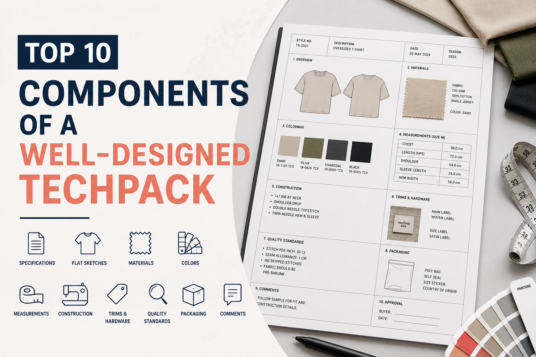
If you do decide to DIY — through CLO3D, Illustrator, or anything else — here’s the checklist your final document needs to hit before it’s ready to send to a factory:
- Technical flat sketches (front, back, and any relevant detail views) — not 3D renders
- Graded point-of-measure chart across your full size range with tolerances
- Complete bill of materials — fabric composition, GSM, trims with part numbers, suppliers if known
- Construction notes — seam types, stitch counts, interfacing, finishing details
- Colorway specifications with Pantone or fabric reference codes
- Label and packaging placement — care label, brand label, hang tag positioning
- Print/embroidery artwork with exact placement measurements, if applicable
Miss two or three of these and you’re not handing the factory a tech pack — you’re handing them a rough draft and hoping they finish your design the way you imagined it. They won’t.
If you want to see exactly what this looks like fully built out, take a look at <strong>see what a factory-ready tech pack looks like</strong> before you start your next sample round — it’s a useful gut check even if you’re still planning to DIY.
The Bottom Line on CLO3D and Tech Packs
CLO3D is a strong tool for what it’s built for — pre-sample visualization, fit testing, and presenting your collection digitally to buyers or investors. It is not, by itself, a tech pack, and submitting a CLO3D export as your only spec document to a factory is one of the more common (and avoidable) mistakes we see first-time founders make.
If you’ve got the design background and the time, build it yourself — just make sure you’re building a real construction-spec document, not just a pretty 3D file. If you don’t have either, that’s not a failure, it’s just math: a few hundred dollars and a few days for a tech pack built right the first time, versus a failed sample round, a delayed launch, and a factory that filled in your blanks with their cheapest guess.
We’ve built tech packs for founders coming from CLO3D, from Canva templates, from a notebook sketch and a voice memo. The starting point doesn’t matter. What matters is what lands on the factory’s desk. If you’d rather skip the learning curve and get a tech pack a factory will actually run with on the first try, <strong>our tech pack pricing</strong> breaks down exactly what that costs and how fast we turn it around — worth a look before you spend another weekend in a 3D modeling tutorial.
Frequently Asked Questions
Can a factory accept a CLO3D file instead of a tech pack?
Some factories will accept CLO3D files as a visual reference, but almost none will use it as their primary working document for cutting, sewing, and grading. Most will still ask you for a traditional flat-sketch tech pack with a measurement chart, BOM, and construction notes — so plan for both if you’re committed to using CLO3D in your workflow.
Is CLO3D worth learning if I’m a first-time fashion founder?
It depends on your goals. If you want to pitch investors or buyers with realistic digital renders before sampling, yes — it’s a strong tool for that. But don’t expect it to replace your tech pack, and don’t expect to learn it (well enough to produce factory-ready output) in a weekend.
What’s the cheapest way to get a tech pack made?
Building it yourself in a free template or trial software is the cheapest option upfront, but it’s also the highest-risk if you’re not confident in garment construction — a single failed sample round usually costs more than what you saved on the document itself. A flat-rate tech pack service is often the more predictable cost once you factor in the risk of redo rounds.
How long does it take to make a tech pack from scratch?
For someone experienced in Illustrator and garment construction, a single tech pack typically takes anywhere from a few hours to a full day, depending on garment complexity. For a first-time founder learning as they go, it can take 10-20+ hours spread across days or weeks — and that’s before you know if the factory will accept it as-is.
Table of Contents